
I’ll walk through the architecture of my home server setup which runs on top of an Orange Pi 5 .
The reason I decided to have a home server is to block ads and malware for all my devices through a DNS sinkhole . Since then, I realized how useful a Pi could be with additional programs. There are lots of home server programs out these that are good alternatives to paid software! In my case I wanted to strike a balance between software that I already pay for and software that I could host on my own.
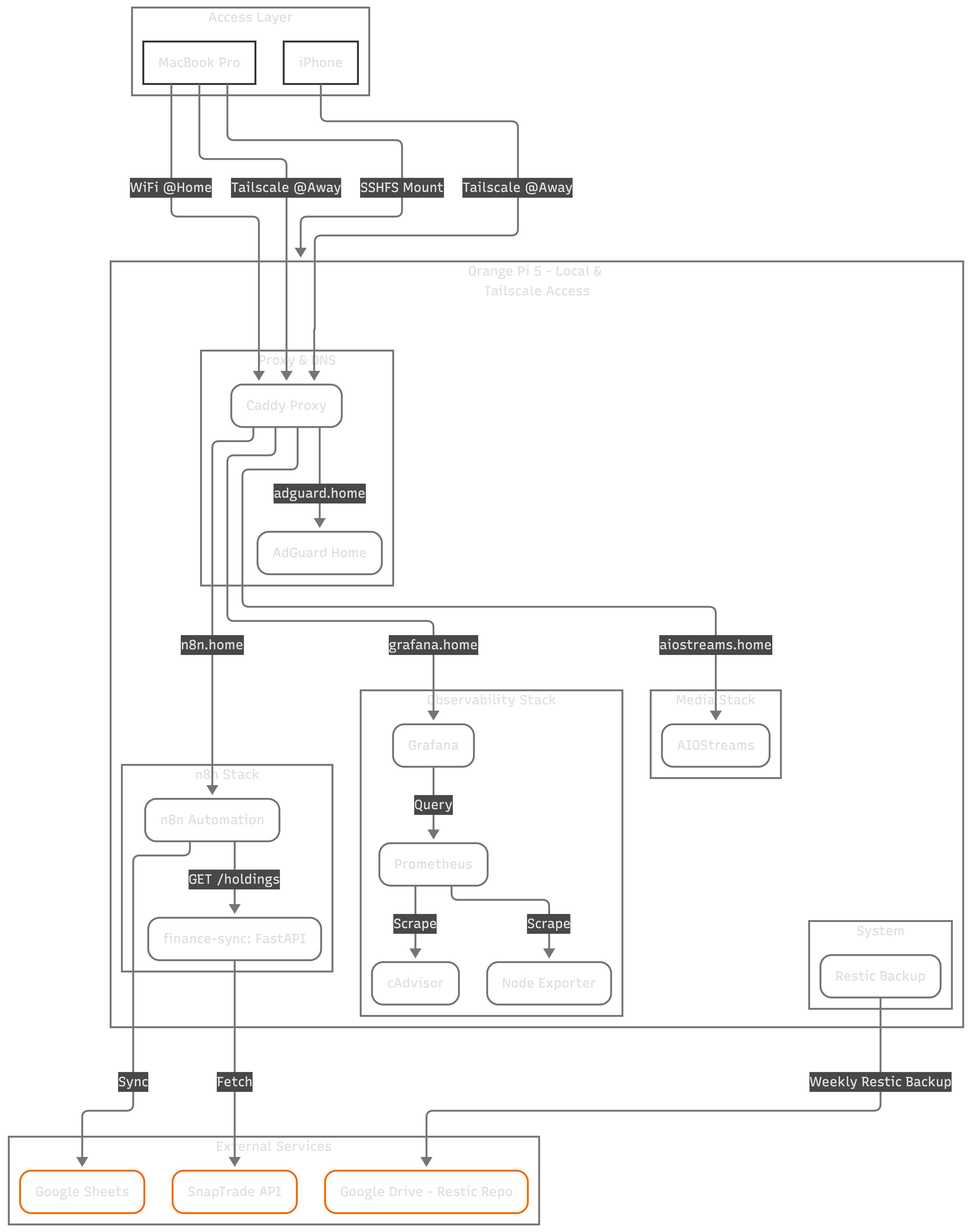
Home Server Architecture
Assumptions
- SSH access to the home server.
- Any terminal based AI agent, my choice is Gemini which I access through gemini-cli.
Development Workflow
While my home server isn’t powerful enough to run Gemini locally, it doesn’t have to. Gemini only needs access to a filesystem and permissions to run commands.
- Access to a filesystem - I mount the Pi’s entire filesystem to my MacBook Pro using SSHFS . To my Mac (and Gemini), the server’s code looks like a local folder. Because Gemini is launched within this mounted codebase, it has a a good level of understanding of my stacks.
# One time mount
sshfs myuser@myhost:/home/myuser/infrastructure ~/mnt/orangepi

# Then I can start gemini at ~/mnt/orangepi.
- Running commands - I’ve taught Gemini that the filesystem it sees is thanks to the mount and I’ve told it how to run commands directly on the Pi via SSH therefore if it needs to check something outside the mounted filesystem it can run any SSH command.
This REPL environment allowed me to iterate very fast in my small SBC.
Secure Remote Access: Tailscale
I use Tailscale which is installed across all my devices. The primary motivator was that the DNS sinkhole would be useful when I’m away from home. Inside the tailnet, AdguardHome acts as the DNS and is configured to filter most of the annoying ads and malware traffic which means that I don’t get to see ads across my devices even when I’m not at home1!
Zero Trust
Before getting an Orange Pi I had lots questions about having a device in my home network that’s always connected to the internet and possibly running programs that could be compromised. I have this mindset about security in containers: any container running on my server is potentially vulnerable to an attack I’m not yet aware of. Therefore, I setup the stacks under the assumption that a container will be compromised at some point with something outside my control.
To mitigate the blast radius of such an event, I implement a “Zero Trust” policy at multiple levels:
- I never run containers in
hostnetwork mode unless absolutely needed. Each stack runs in its own isolated bridge network, which prevents a compromised container from sniffing traffic on the host interface. - To prevent a compromised container from crashing the entire system (a Denial of Service attack), every single service has
cpusandmemorylimits defined. If a container is compromised, it only kills itself but not the Pi. - While my trusted devices (laptop, phone) can access the Pi via SSH or HTTPS, the Pi can’t initiate connections to other devices on my local network. This containment ensures that a breach on the Pi doesn’t become a pivot point to attack my other devices.
- I never use the
:latesttag for container images because usinglatestis asking for a supply chain attack during a routine update. Instead, I pin every image to a specific version or digest that I’ve verified.
Stacks
I’ve organized the system into independent Docker Compose stacks. This separation of concerns makes updates and troubleshooting much easier.
Also, since Gemini is aware of the setup, it’s super simple to make refactors in the codebase. For example, initially my gateway and media
server were in the same docker-compose.yaml file, the refactor to multiple files including verification that the services were
up and running like before took a single prompt.
Here is a breakdown of the core stacks currently running:
Security & DNS: AdGuard Home
I dislike how obstrusive ads are. While Chrome Extensions could block ads when I’m on my laptop I can’t install them on my phone.
AdGuard Home handles DNS for my entire network, blocking trackers and malware at the source. It’s wonderful not having to see ads in my phone whenever I read news articles.
I’ve configured DNS rewrites so that internal aliases resolve correctly whether I’m on my local Wi-Fi or connected via Tailscale.
The ready-to-use docker compose template is at https://github.com/2Tiny2Scale/ScaleTail/tree/main/services/adguardhome .
The Gateway: Caddy
Everything is fronted by Caddy . It acts as a reverse proxy with internal TLS termination.
Automation: n8n + FastAPI
For automations, I run n8n alongside sidecar containers with my personalized logic.
The finance-sync sidecar is a small python server that I developed that can fetch data from my financial sources.
Once it fetches data it’ll output a summary of my holdings to stdout as JSON.
Then in the n8n UI I configured a workflow to write the data to Google Sheets.
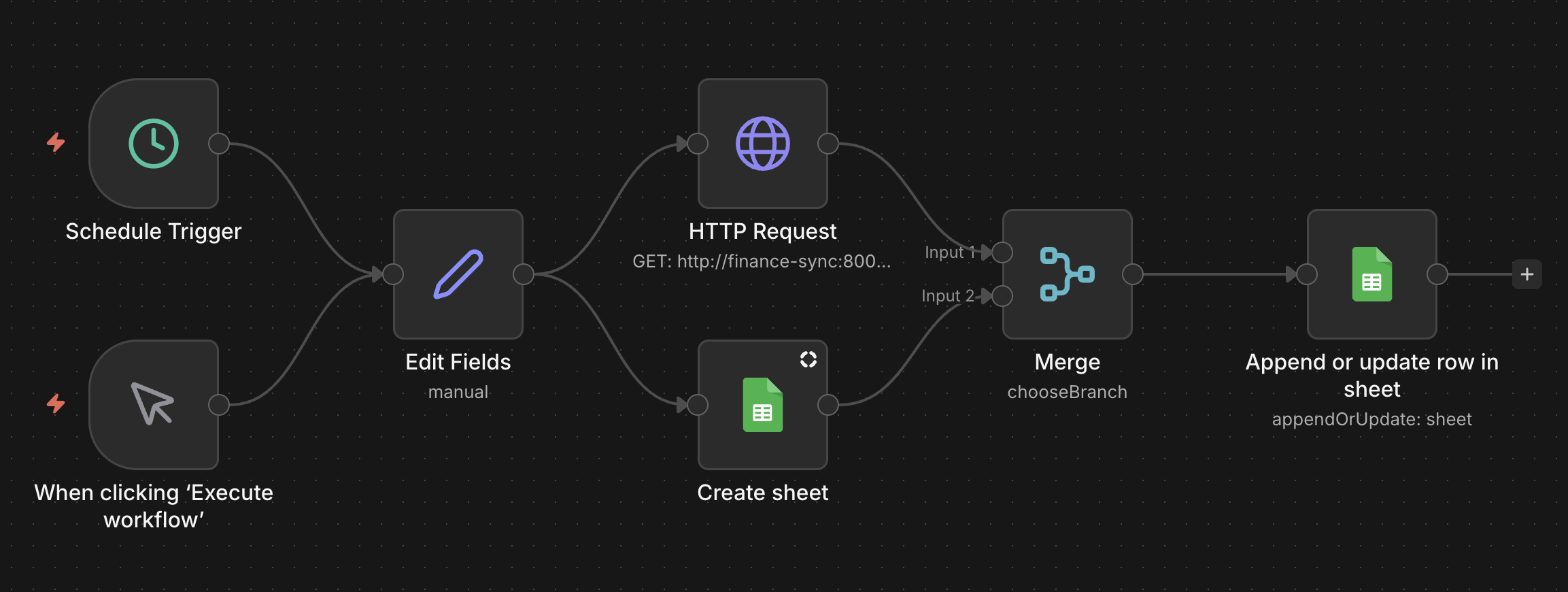
n8n
This workflow runs regularly portfolio adjustment preferences.
Whenever I need to make an analysis of my financials, I give the spreadsheet to Gemini and ask it to draw conclusions based on my goals.
Media Server: AIOStream
My favorite streaming platform is Stremio because it can play many video formats on the web through a streaming server. I use it to play my favorite anime and to learn Japanese with my chrom extension Subtitle Insights .
Observability: Prometheus & Grafana
My observability stack includes Prometheus for metric collection and Grafana for visualization, with cAdvisor and Node Exporter tracking performance at both the container and host levels. Every service has resource limits on CPU and memory to ensure no single container can starve the system.
Monitoring gives me a great view of the current health of the Pi, but it can’t save me from a total hardware failure or a catastrophic mistake. That’s where the backups come in.
Backups
A home server without a backup is just a temporary hobby. I use Restic and Rclone to push encrypted snapshots to my Google Drive.
The entire process is automated through a bash script and scheduled weekly via crontab. I use a “Sandboxed” Google OAuth client, so the Pi can only see its own backup folder and nothing else. Knowing that I can restore the whole setup from a fresh SD card in minutes gives me the peace of mind to experiment without fear of losing data.
Key Takeaways
About the setup, mounting the Pi’s filesystem through SSHFS and letting Gemini know the environment where it’s running in helped me iterate very fast. While I’m happy with the current components of the stack the home server is like .dotfiles , always a work in progress.
It’s great the Gemini knows how to operate in the codebase because it means that I could focus on some other things and free up deep knowledge I’d have needed of this stack.
-
The tradeoff is increased latency because every DNS request is resolved only in my home server. That means that if I’m very far away from home that I’d need to wait a lot! For now, I only enable it when I’m away from home but I haven’t tried it out outside my city yet. ↩︎