
An image can be abstracted as a function:
Where $R \in \mathbb{R}^2$ is a rectangular area and $V$ is a set with the possible pixel values. The following are examples of the set $V$:
- $V = \mathbb{R}^+$ (non-negative reals) for grayscale images; each pixel represents only brightness and no color.
- $V = (\mathbb{R}^+)^3$ (combinations of 3 sets of non-negative reals), which is a color image with red/green/blue values for each pixel.
Pixels
A pixel from a camera or scanner is a measurement of the average color of the image in the surrounding area near the pixel.
If an image has $n_x$ columns and $n_y$ rows, a common convention is to count rows and columns from the bottom left. The bottom-left pixel is $(0,0)$, and the top-right is pixel $(n_x - 1, n_y - 1)$.
Note that because of the definition given to a pixel, the coordinate $(0,0)$ is mapped to the center of the pixel $(0,0)$. Therefore, a half-pixel will exist in both the $-\mathbf{x}$-axis and the $-\mathbf{y}$-axis.
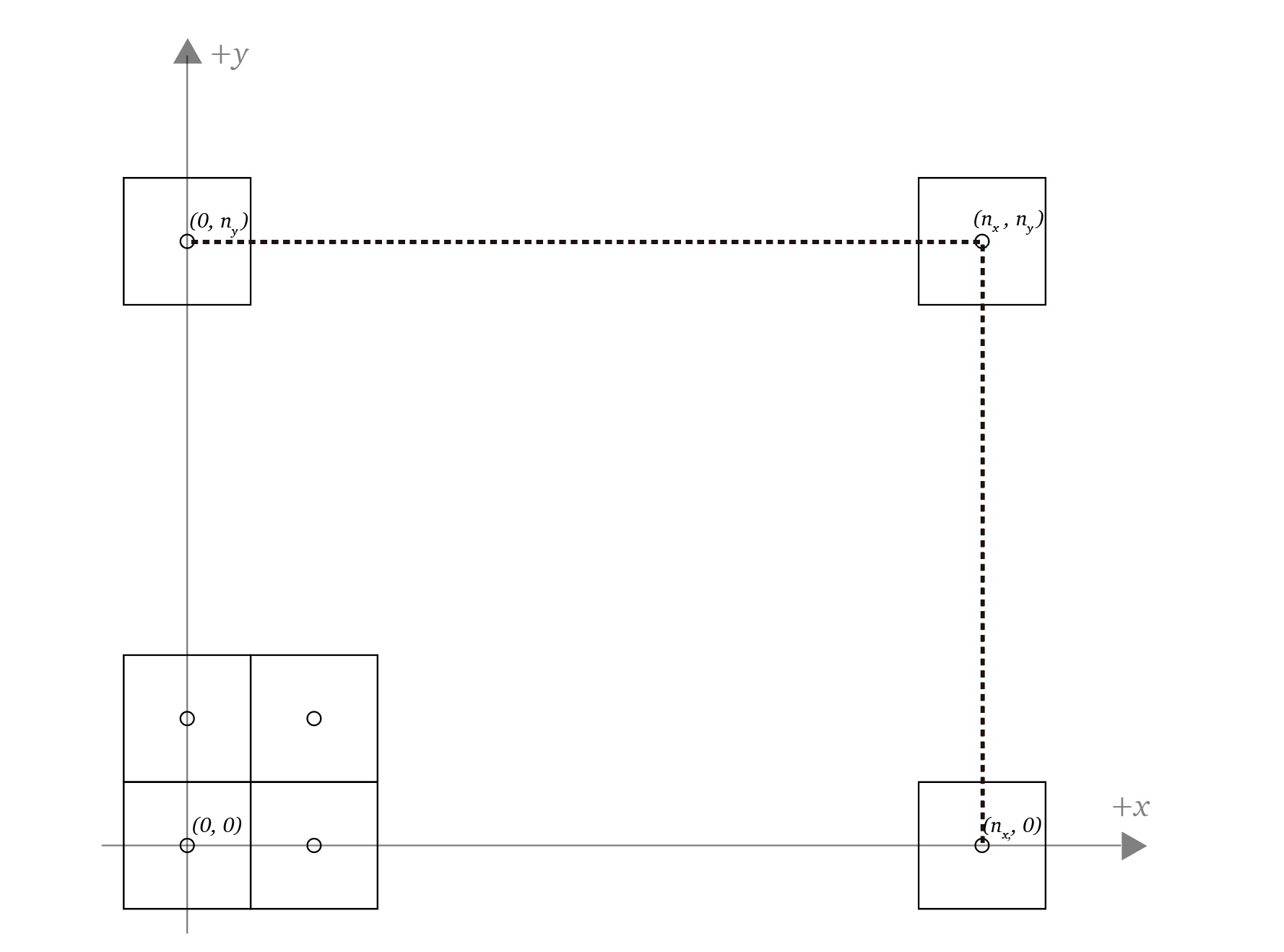
Pixel Coordinates
So the domain of a $n_x \times n_y$ image is:
Pixel Values
The value of a pixel depends on the precision and range of value needed. For example, high dynamic range (HDR) images store floating-point numbers, allowing a wide range of values. Low dynamic range (LDR) images are instead stored with integers. The following pixel-values are used in a variety of applications:
- 1-bit grayscale per pixel: Images where intermediate grays are not needed, e.g., text.
- 8-bit grayscale per pixel: Images with intermediate grays. It can store a total of 256 gray values, e.g., a grayscale photo.
- 8-bit red, green, and blue (RGB), 24-bits per pixel: Full-color images that allow near 16 million possible values, e.g., consumer photographs, web, and email applications.
- 12- to 14-bit RGB, 36-42 bits per pixel: Raw camera images for professional photography.
- 16-bit half-precision RGB, 48 bits per pixel: HDR images used in real-time rendering.
- 32-bit floating-point RGB, 96 bits per pixel: HDR images for software rendering.